Organizer SMS consent
How calendar organizers can optionally enroll in iTsGenius signup and cancellation text alerts.
Last updated October 3, 2026
Organizer digital opt-in
An organizer signs in to iTsGenius, opens a saved calendar they own, and opens Signup alerts to your phone. A phone number must already be privately verified and associated with that organizer; the form displays only a masked number.
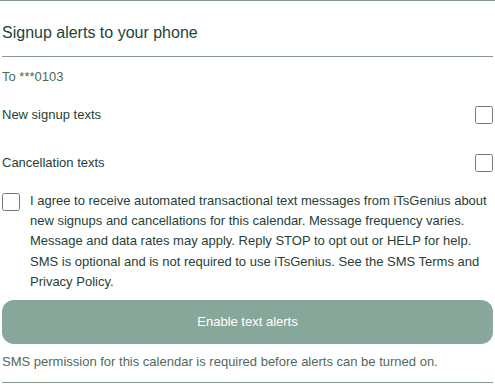
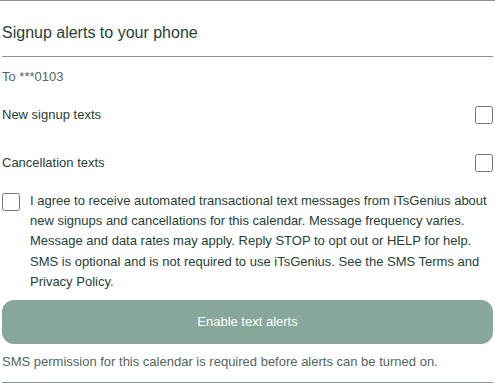
New signup texts and Cancellation texts are separate choices. Both start unchecked. The separate SMS consent checkbox also starts unchecked, and Enable text alerts remains unavailable until the organizer selects at least one alert type and affirmatively checks the consent box.
Disclosure shown before consent
The enrollment form displays this disclosure next to the unchecked consent box:
I agree to receive automated transactional text messages from iTsGenius about new signups and cancellations for this calendar. Message frequency varies. Message and data rates may apply. Reply STOP to opt out or HELP for help. SMS is optional and is not required to use iTsGenius. See the SMS Terms and Privacy Policy.
SMS consent is optional and separate from using iTsGenius, owning a calendar, accepting the general terms, or selecting alert types.
Changing or stopping alerts
After enrollment, an organizer can change the individual alert choices while keeping at least one selected, or use Stop all text alerts to withdraw from this program. Replying STOP also blocks texts, and unresolved restrictions can continue to prevent delivery.
A later START response does not silently re-enroll a calendar. The organizer must return to the calendar and complete the current consent flow before alerts can resume.
Availability and support
This public evidence page does not enroll anyone or activate messaging. Completing enrollment does not guarantee that texts are available or will be delivered.
For help or an opt-out request, contact iTsGenius at hello@itsmedia.net. Read the SMS terms and SMS privacy policy.